


21 Nov 2011
17 Nov 2011
How to run Android apps on your OS
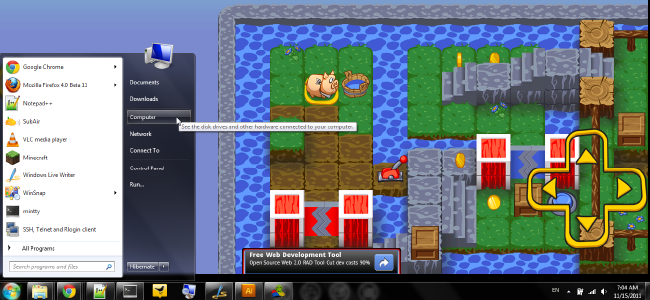
Android Apps on Windows
BlueStacks is essentially a self-contained virtual machine that runs Android apps on your Windows 7 computer. While it’s still in alpha, it’s surprisingly stable, pretty novel, and constantly improving. It has very little set up and runs quite nicely smoothly, albeit with a few limitations. The biggest appeal is that you don’t have to deal with the Android SDK – or even know what that is, really – and so it’s great for beginners. You can easily install apps available from BlueStacks’s list of free apps, and if you have an Android device, you can install many apps from your device via the Cloud Connect app.Why would anyone want to do this? Well, suppose you have an app that you really like and there’s no proper desktop equivalent. You can run it on your main computer instead of on your tiny little Android phone. Or, perhaps you’re thinking about buying a tablet, but you’re not sure what apps you’d like. You can try out many of the free apps that BlueStacks provides, or get a friend with a tablet or phone to show you the apps they use. You can play around with those apps on your desktop or laptop and see if you like them before you buy something you may or may not use. It’s pretty great for developers who want to demo their app, but for some reason don’t have access to a PC with the SDK.
You can use the standard mouse to navigate everything and it works pretty well, but if you’re lucky enough to have a touch-screen, then this works spectacularly. Some of the games may require nicer hardware (and BlueStacks is partnering with AMD for this in the future), but most apps run fine on their own. We tried this on a year-old netbook and things ran perfectly fine. There were a few hiccups here and there, but no crashes or major slowdowns.
BlueStacks Installation
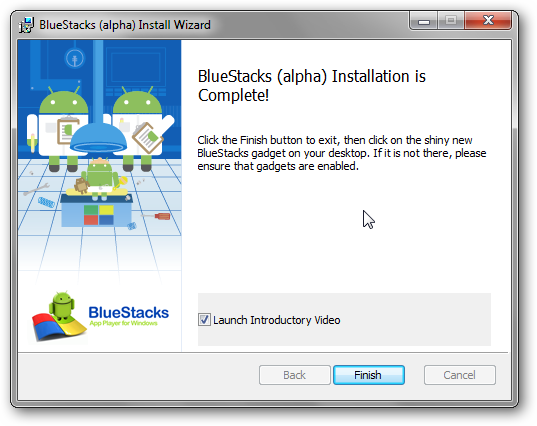
After the program is installed, the installer will ask if you would like to view an introductory video. It’s very short and gives you the basics of how the program works.
The Download File is of size : 117.08 MB
Topic Controversy : How-To Geek
Topic Writer : http://tinyurl.com/cpm4f7b


16 Nov 2011
The 40th birthday of the first popular microprocessor,Intel 4004

40 years ago today ,electronics and semiconductor trade newspaper Electronic news ran an advertisement for a new kind of chip.The Intel 4004 waz a $60 chip in a 16 pin Dual in line package was an entired CPU packed onto a single integrated circuit(IC)
At a bare min, a CPU is an instruction decorder and an Arithmetic Logical Unit(ALU);the decorder reads the memory and directs the ALU to perform appropriate arithmetic.The 4004 integrated the different Cpu components into one 2300-transistor chip.
4004 wasnt just a new direction for the computer industry;it was also a new direction for Intel .Since its founding in 1968 ,Intel was only a memory company,making various kinds of RAM ,boasting some of the fastest and highest density memory in the industry,.It wasnt really in the business of making CPU's or logic chips.Nonetheless ,Japenese electronic computer company Busicom approached Intel in 1969,asking the memory company to build a new set of logic chips for its calculators.That Intel paid Busicom for the rights to the design, allowing the firm to sell and marketing the chip family.Branded as MCS-4,the chips started production in june 1971,being before advertised to the commercial markets 40 years ago today.
AMD's 16 core Bulldozer Released

AMD released 2 new families of the Opteron processors and released previewed plans for a third, in the company's latest effort to take back market share from Intel's Xeon CPU in the server market .
The Opteron 6200 series processors ,previously known by the code -name 'Interlagos"integerates two of the dies used for the desktop processor into a multi-chip module packing upto 16 crores, the most evr on a x86 processor.Opteron 6200's are targeted on the high perfomance server market.
AMD sever product marketing manager Michael Detwiler told Ars that customers could see up to a 35 percent performance server processor. He also claimed that Intel's Xeon 5600 on some application- particularily in floating-point processing heavy computing.
Older versions like windows Xp will encounter problems in 6200 series. Detwiler said that the 6200 series has been tested as compatible with Windows 2003 server pack 3 and after .Any Linux based n 2.6.31 or earlier also fails ..But it'll be a big revolution int he history of the computer ..
Subscribe to:
Posts (Atom)


480ut mE

